


The Resurgence of the Desktop Computer: Why the Powerhouse of the Workspace is Better Than Ever in 2026
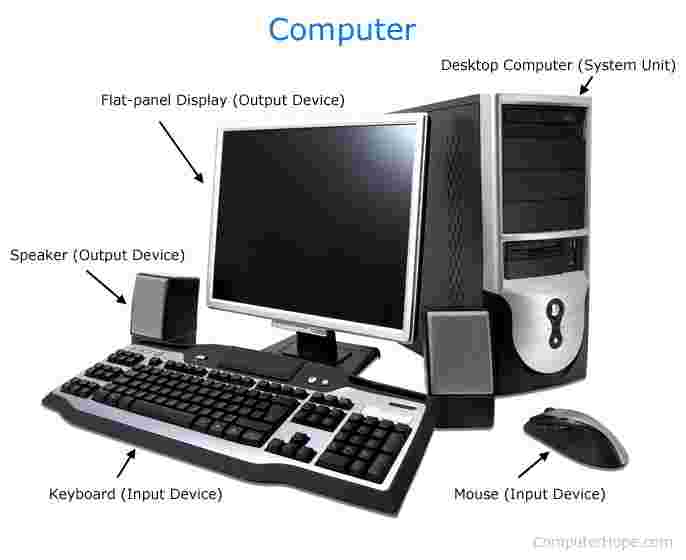
In a world increasingly obsessed with portability, the desktop computer remains the undisputed king of performance, longevity, and ergonomic excellence. While laptops and tablets have their place in the "mobile" moments of our lives, the desktop is the anchor of the serious workspace.
As we move through 2026, the desktop has undergone a radical transformation. No longer just "the beige box" under a desk, modern desktops are sleek, silent, and incredibly powerful machines that serve as the nerve center for creative studios, high-stakes trading floors, and professional gaming setups. This guide explores the evolution of the desktop, why it remains the best value-for-money investment in tech, and how to choose a system that will power your ambitions for the next decade.
1. The Desktop Advantage: Why Power Still Matters
The fundamental advantage of a desktop computer is thermal headroom. Because desktops have larger cases and more robust cooling systems, their components can run at higher speeds for longer periods without "throttling."
-
Sustained Performance: Unlike a laptop, which must slow down its processor to prevent melting in a thin chassis, a desktop can maintain peak performance during intensive tasks like 8K video rendering or complex AI training.
-
Upgradability: The desktop is the only computing platform that grows with you. If you need more RAM, a faster graphics card, or additional storage, you can swap parts in minutes rather than replacing the entire machine.
-
Ergonomics: A desktop setup allows you to separate your screen from your keyboard, which is essential for maintaining a healthy posture.
2. Defining Modern Desktop Categories
To find the right machine, you must first identify which "class" of desktop fits your lifestyle.
The All-in-One (AiO)
Popularized by the iMac and high-end Windows equivalents, the AiO integrates the computer components directly behind the screen.
-
Best for: Reception desks, home offices, and minimalist environments.
-
The Benefit: A single power cable is often the only wire you'll see.
The Mini PC
Small enough to be mounted to the back of a monitor, these "tiny but mighty" machines have seen a massive surge in popularity.
-
Best for: Digital signage, media centers, and space-constrained office cubicles.
The Full-Tower Powerhouse
The traditional vertical tower. These offer the most space for high-end graphics cards, multiple storage drives, and liquid cooling systems.
-
Best for: Gamers, engineers, and creative professionals.
3. The Core Specs of 2026: What’s Inside the Case?
To ensure your desktop isn't obsolete in two years, you need to prioritize three main components.
The CPU (The Engine)
In 2026, we have moved into the era of "Hybrid Architecture" processors. These CPUs combine "Performance" cores for heavy tasks and "Efficiency" cores for background processes. For a modern desktop, aim for at least 8 to 12 cores.
The GPU (The Visual Brain)
Even if you aren't a gamer, a dedicated graphics card is becoming essential. Modern web browsers, video conferencing software, and AI-driven productivity tools all offload work to the GPU to keep the system snappy.
VRAM and RAM (The Workspace)
While 16GB of RAM was the standard for years, 32GB is the new baseline for a performance desktop. This ensures that you can have 50+ browser tabs, a Zoom call, and a creative application open simultaneously without the system stuttering.
4. The Shift Toward "Quiet Power" and Liquid Cooling
One of the biggest improvements in desktop technology is noise reduction. Modern desktops utilize advanced liquid cooling loops or massive heat-pipe towers that move heat away from sensitive components so efficiently that the fans rarely need to spin at audible speeds. A high-performance desktop in 2026 should be felt in its speed, not heard in its noise.
5. Building a Scalable Digital Core with Tecisoft
A desktop computer is rarely a standalone tool; it is the core of a larger digital ecosystem. To maximize its potential, it must be supported by high-quality networking gear, reliable peripherals, and a robust hardware infrastructure. A $3,000 desktop is only as fast as the network it’s connected to and the hardware that supports it.
For professionals looking to build a truly integrated workspace, Tecisoft offers an essential range of IT hardware and strategic solutions. Whether you are sourcing the networking components to ensure your desktop has a dedicated 10Gbps link to your server, or seeking the professional-grade accessories that turn a powerful tower into a complete workstation, having a reliable partner for your hardware needs is critical. By ensuring your supporting tech is as capable as your desktop, you create a seamless environment where performance is never capped by a weak link in the chain.
6. Connectivity: The Port Advantage
Laptops are notorious for lacking ports, but the desktop is the king of connectivity. A standard desktop in 2026 offers:
-
Thunderbolt 5: Supporting 80Gbps to 120Gbps data transfers.
-
Multiple 4K Display Outputs: Most modern desktops can drive three or four monitors natively.
-
Internal Expansion: PCIe 5.0 slots for high-speed NVMe storage that can read data at 14,000 MB/s.
7. The Desktop as an AI Workstation
The most significant trend in 2026 is the "Local AI" movement. Instead of sending all your data to the cloud, modern desktops feature dedicated AI accelerators (NPUs) that allow you to run Large Language Models and image generation locally. This offers two massive benefits:
-
Privacy: Your data never leaves your machine.
-
Speed: No more waiting for cloud queues; your desktop processes AI tasks in real-time.
8. Ergonomics: The Desktop’s Hidden Superpower
Long-term computing health is all about the "Delta"—the distance between your eyes, your hands, and your screen.
-
Screen Height: Your monitor should be at eye level to prevent "tech neck."
-
Keyboard Position: Your elbows should be at a 90∘ angle. Because the desktop allows you to place these components independently, it is the only form factor that truly allows for a "perfect" ergonomic setup.
9. Longevity and Total Cost of Ownership (TCO)
While a high-end desktop might have a higher upfront cost than a budget laptop, its Total Cost of Ownership is much lower.
-
Repairability: If a desktop screen breaks, you buy a new monitor. If a laptop screen breaks, you often have to buy a new laptop.
-
Lifespan: A well-built desktop can easily last 7 to 10 years with minor mid-life upgrades, whereas a laptop typically starts to decline after 3 or 4 years due to battery degradation and thermal wear.
10. Conclusion: The Power of Presence
The desktop computer remains the ultimate tool for those who view their computer as a primary instrument of their trade. Whether you are a coder, a designer, a gamer, or a data analyst, the desktop offers a level of reliability and power that portable devices simply cannot match.
By investing in a high-quality desktop and supporting it with a robust IT infrastructure, you aren't just buying a machine; you are building a professional-grade platform for your future. In the world of tech, portability is a convenience, but power is a necessity. Make the desktop the heart of your workspace, and give your ambitions the room they need to grow.
 Romaian
 English
 Arabic
 French
 Spanish
 Portuguese
 Deutsch
 Turkish
 Dutch
Dutch
 Italiano
 Russian
 Portuguese (Brazil)
 Greek
Greek
